On this page
Internet beyond mobile coverage
Western Australia is a good place to get away from everything. Sometimes that includes phone reception. A coastal campsite, a station stay or a stop along a remote road can leave you without the connection you need to contact family, check conditions or finish a day's work.
Starlink gives you another way online. With a suitable service plan, power and a clear view of the sky, its portable satellite equipment can provide internet at camp without relying on a nearby mobile tower.
For a long WA road trip where staying connected matters, Starlink belongs high on the packing list. It is particularly useful for caravanners, remote workers and travellers spending several nights away from reliable mobile coverage. For a short city break, your phone may be enough.
Information checked 24 September 2026. All prices are in Australian dollars (AUD).
Why it earns its place on a WA road trip
Starlink gives you more choice of where to camp, because phone reception does not have to decide every overnight stop. Starlink is especially worth considering if a missed work call or several days without internet would disrupt your plans.
- Keep in touch from camp. Send messages, share your location and make internet calls when the connection is working.
- Check the next day's route. Look up road restrictions, weather, park alerts and accommodation before moving on.
- Work between travel days. Email, online meetings and document uploads become more practical away from towns. Test your connection before an important call.
- Connect more than one device. Share the camp Wi-Fi with your phone, tablet or laptop.
- Keep family travel manageable. Download schoolwork, arrange bookings and stream when your plan, signal and power budget allow.
- Carry an alternative to mobile data. A working satellite connection gives you an additional option when the local mobile network is unavailable.
This is useful on trips through the Coral Coast, Pilbara, Kimberley, Goldfields and Nullarbor, as well as at individual campsites closer to Perth. Check availability and campsite conditions along your own route.
Do you actually need it?
| Your trip | How Starlink fits |
|---|---|
| Perth, Fremantle and a few nights in serviced accommodation | Usually an optional extra. Check your mobile plan and accommodation Wi-Fi first. |
| Several weeks in a caravan or campervan | A strong option if you want regular internet at camp and can supply power. |
| Working while travelling in regional WA | Worth serious consideration, with another connection available for critical work where possible. |
| Remote camping, fishing or prospecting trips | Useful for internet at base camp. Carry emergency communication equipment appropriate to the route as well. |
| A short holiday with little need to be online | Compare the full ownership cost with hiring equipment or using internet only in towns. |
Starlink provides internet; it is not a substitute for a personal locator beacon or an appropriate satellite phone. WA Police and Parks and Wildlife advise planning communications for remote travel. Keep offline maps, tell someone your route and carry equipment you know how to use.
Choose the service plan separately from the kit
The dish is the hardware. Residential and Roam are service options. Buying portable hardware does not make every subscription suitable for travel.
For a trip with changing campsites, start by comparing Roam. Residential service is intended for an approved service address; do not assume a home subscription can follow your vehicle around WA. The referral offer includes both categories, but the right choice depends on how you will use the service.
At the time of checking, Starlink's Australian Roam page displayed:
| Plan | Advertised monthly service | Consider it for |
|---|---|---|
| Roam 100GB | From A$85 | Occasional travel and controlled data use. After the included high-speed allowance, service continues at lower speed. |
| Roam Unlimited | From A$210 | Frequent travel, shared internet and heavier data use. Performance still varies. |
Hardware, delivery, accessories and power equipment are separate parts of the budget. Kit prices and promotions can vary by area. Check the complete Australian checkout total before buying, along with the billing start date.
Starlink also offers Standby Mode for a monthly fee on eligible services. Check the current charge, restrictions and when a change takes effect in your account. Do not budget on the assumption that pausing is free or that service is billed by the day.
Why consider Starlink Mini?
For most travellers prioritising portability, the Mini is the sensible starting point to compare. It combines the satellite terminal and Wi-Fi router in one compact unit, so there is less equipment to put out at each stop.
Starlink's current Mini specification sheet lists a weight of about 1.16kg with its kickstand, average power consumption of 25-40W, and an operating temperature range up to 50°C. The full packed kit weighs more, and the Mini has no built-in battery.
A larger Standard kit may suit a more permanent caravan arrangement, particularly if you already own one. Check the specifications and instructions for that exact model. This page's setup diagrams are for a portable Mini used while parked.
Before leaving home
Set everything up once while you still have reliable internet and time to solve problems. Download the Starlink app, arrange activation, confirm your account access and check that your travel plan is active for your departure.
Pack the terminal, kickstand, supplied power equipment and any compatible accessory you intend to use. Include your phone charger and protection for the equipment during transport. Save the official setup guide offline.
Choose a safe power arrangement before the trip. Test it for several hours with the same cables, battery and devices you will use at camp. A setup that briefly switches on has not yet proved it can support a working day.
Installation at camp: six practical steps
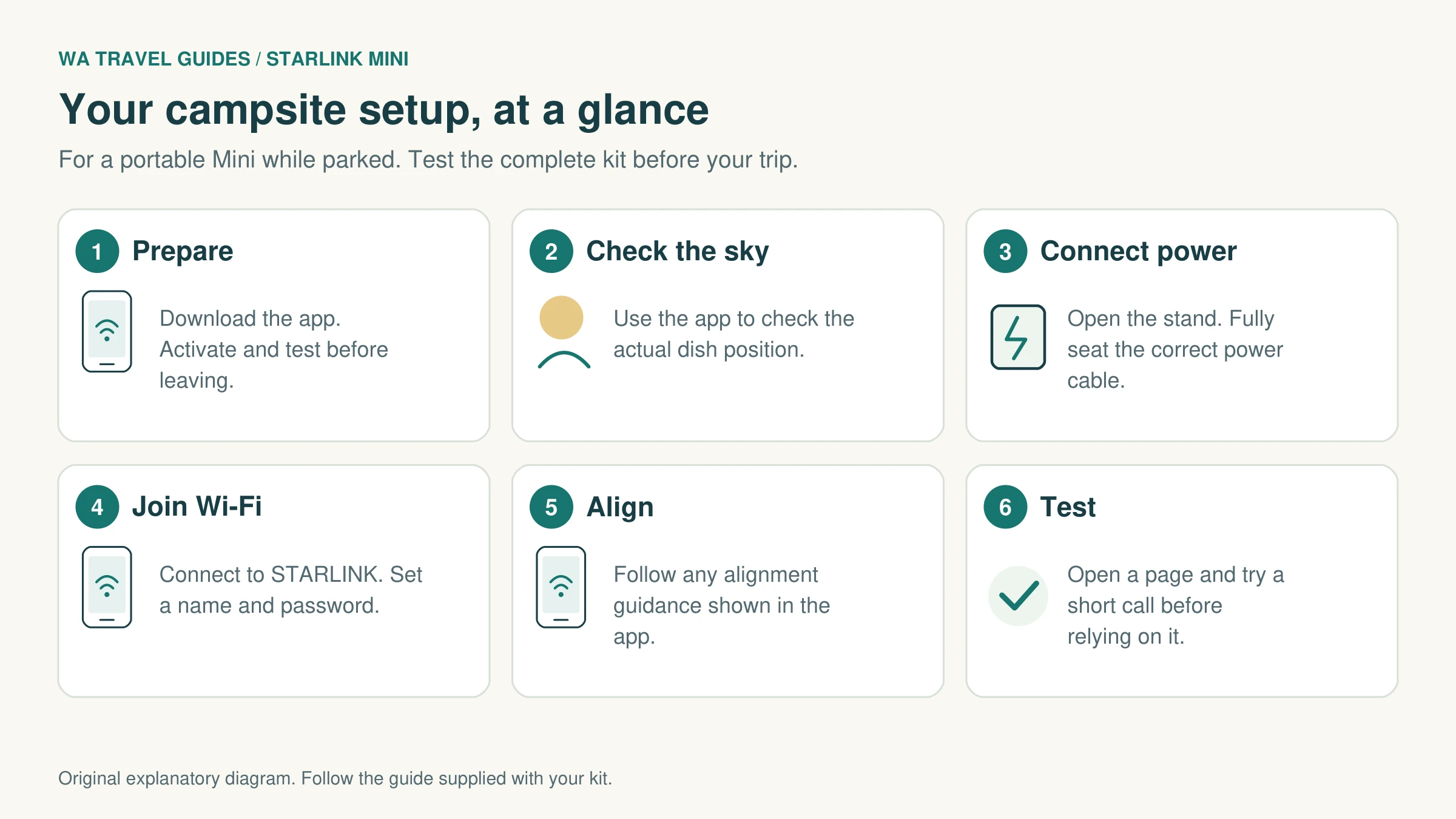
1. Find clear sky
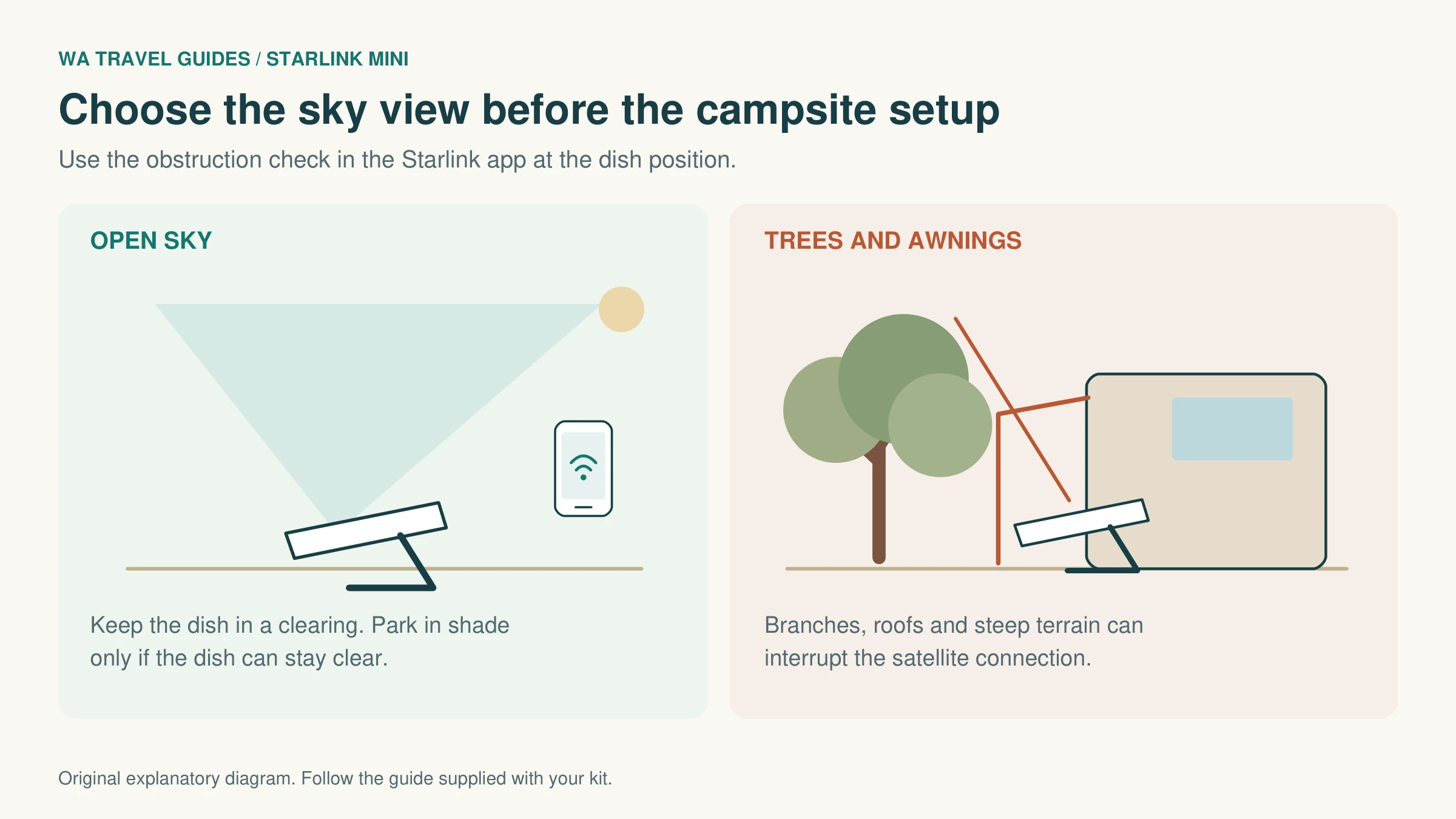
Use the Starlink app's obstruction check at the intended dish position. Trees, an awning or a cliff can interrupt the view. An open clearing often works better than the shady spot where you park.
2. Put the Mini on a stable surface
Open the kickstand and choose a secure, level spot away from vehicle movements and footpaths. Keep the terminal out of standing water and route the cable where it will not be crushed or tripped over.
3. Connect the power
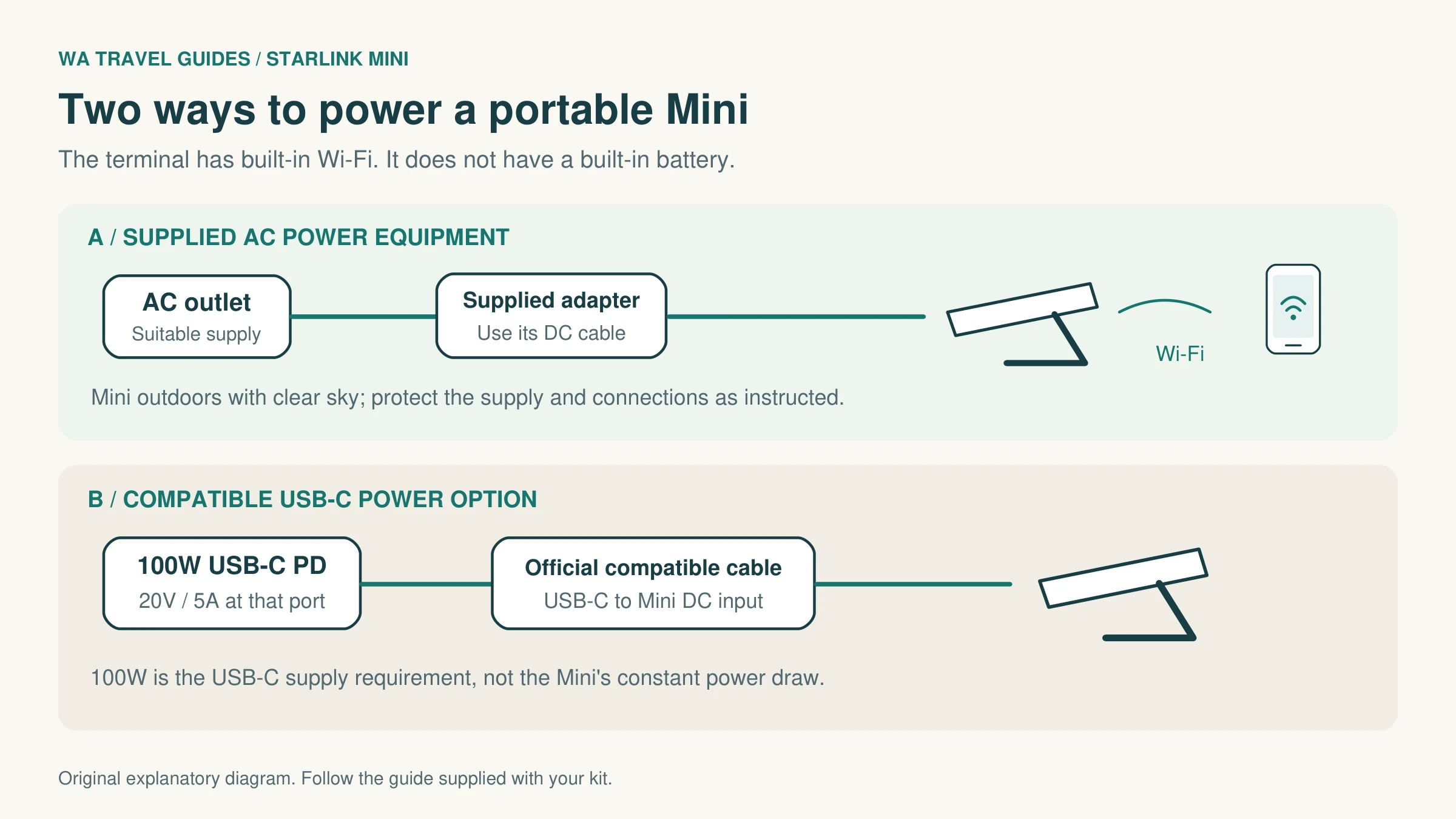
With the power source switched off, fully seat the supplied DC cable in the Mini, connect its other end to the supplied adapter, then turn on a suitable power outlet. Follow the instructions for your exact kit.
4. Connect your phone to Wi-Fi
Open your phone's Wi-Fi settings and join the new STARLINK network. Use the app to set a network name and strong password. Reconnect your devices if you change the network details.
5. Follow the app's alignment guidance
If the app requests alignment, use its tool to adjust the Mini. Follow the actual guidance at your location, rather than a fixed compass direction copied from someone else's setup.
6. Test before relying on it
Once online, open a webpage and try a short internet call. Check any app alerts. Moving the dish can be more useful than repeatedly restarting it if branches or other objects obstruct the sky.
Powering it away from mains electricity
The Mini needs an external power source throughout use. A portable power station can run its supplied AC adapter, provided the outlet is compatible and has sufficient capacity.
For the official Mini USB-C accessory, Starlink specifies a 100W USB Power Delivery source supporting 20V/5A. That is a compatibility requirement, not a claim that the Mini constantly draws 100W. An ordinary phone charger or a battery with a high total output spread across several ports may not meet it.
Check the output of the particular port you will use, as well as the cable. For a vehicle DC installation, use compatible equipment and have permanent wiring fitted by a qualified installer. Do not improvise connections to a vehicle battery.
A simple power budget: a Mini averaging 30W for six hours uses about 180Wh. Allow additional capacity for conversion losses, start-up demand and other devices. Solar charging varies with the panels, shade and weather, so test the whole arrangement before depending on it.
Placement matters as much as the hardware
Leave the dish in the open while keeping your battery and other equipment within their own temperature and weather limits. A parked vehicle can become much hotter than the outside air. Keep connectors clean and dry, and follow the manufacturer's sealing instructions.
Remember that satellite reception and Wi-Fi range are different things. Your dish can have a clear sky view while a metal caravan weakens the Wi-Fi reaching your laptop. Test from the seat where you actually intend to work. If needed, investigate compatible networking accessories instead of moving the dish under an obstruction.
For strong winds or severe weather, follow official advice and secure or pack away the kit as appropriate. A portable kickstand is not a permanent vehicle mount.
Can it work while driving?
Starlink supports in-motion use with certain plans, hardware and authorised locations, including compatible Mini arrangements. Residential service and Standby Mode are not substitutes for an eligible in-motion plan.
Using it while moving requires the correct mount and a secure installation. Do not put the portable kickstand on a vehicle roof and drive away. This guide covers setting up after parking; consult Starlink's current in-motion guidance and a competent installer for a permanent vehicle setup.
Calls, weather and road information
Internet calling apps can work over the connection. Ordinary calls using your mobile number depend on your phone, carrier and plan supporting Wi-Fi calling. Enable and test that feature before departure; an internet connection alone does not guarantee it will work.
Useful pages to save before travelling include Emergency WA, the Main Roads WA Travel Map and DBCA Park Alerts. Check them when connected, but do not make your emergency plan depend on an internet service being available.
If the connection disappoints
| What you notice | What to check first |
|---|---|
| Connected to Wi-Fi but no internet | Service activation, the current plan and app status messages. |
| Repeated interruptions | Obstructions at the dish, power stability and fully seated cables. |
| Good connection beside the Mini, poor inside the caravan | Local Wi-Fi range and the vehicle's metal body. |
| Slow service | Your data allowance, network congestion, other devices downloading and app alerts. |
| Problems after hours of use | Remaining battery capacity and heat around the power equipment. |
Check the app for obstruction reports, power problems and service alerts. If basic checks do not help, follow Starlink's current support instructions. Avoid making a factory reset your first response, as it removes network settings.
How to claim the referral offer
- Start from our Starlink referral link.
- Select Australia and buy a kit with the eligible Residential or Roam option that suits your needs.
- Confirm that the referral offer is associated with your order before paying. If it is unclear, ask Starlink to confirm it.
- Allow for hardware, accessories, delivery and the first month's service in your budget.
- Check your second month's invoice for the service credit. Keep your order confirmation if you need to query it.
The offer is a second-month service credit, not free hardware or a free first month. Starlink's referral terms require a customer who has never subscribed before, a kit and subscription purchased directly through the referral link, and a service address in the same country as the referrer's. Retail purchases and private transfers do not qualify under these terms. Activating your existing overseas kit should not be treated as an eligible referral purchase. Check the current terms and any other promotion before ordering.
Bringing your own Starlink from overseas
An overseas kit may be usable in Australia, but an Australian subscription is not an automatic add-on to your existing account. Starlink distinguishes temporary travel from moving your account to another country.
Visiting Australia on holiday
Starlink's current guidance tells visitors to keep their home-country account and use an eligible travel plan, rather than cancel and transfer the kit for a holiday. Roam Unlimited includes up to 30 days outside the registered home country at a time. Other Roam plans are limited to the home country or specified grouped regions, so a European or New Zealand Roam 100GB plan should not be assumed to cover Australia.
Complete Travel Registration in your account before international use. It normally requires identity information, a passport or another accepted photo ID, and a live portrait. Follow any destination-specific requirements shown in your account.
For longer trips, check Priority options before departure. Starlink currently describes Local Priority as allowing up to 60 days of total international use, including days already used on Roam Unlimited. Global Priority has no international-use time limit under the published travel policy, subject to service availability and local rules. These plans have different pricing and data arrangements.
Moving the kit to an Australian subscription
Starlink documents country transfers for relocation. The process involves cancelling the old service, releasing the owned kit from that account, then creating a new account with a different email address and an Australian service address. You use the kit's Starlink identifier during activation and select an available Australian plan. You cannot simply change an overseas account's service address to Australia.
Transfer restrictions apply: the account must have no unpaid balance, and the published waiting period is 120 days from purchase or 90 days from activation, whichever comes first. The help page also says service must remain active for 90 days from activation. Rental kits cannot be transferred as owned equipment without resolving the rental arrangement. Confirm your kit's eligibility with Starlink before cancelling anything.
If you are a temporary visitor specifically wanting an Australian subscription, ask Starlink to confirm that your kit and circumstances qualify before travelling. The public guidance does not guarantee this option to every tourist. Provide the model, purchase country, kit identifier and intended stay through Starlink's own support channel.
Extra charges and the referral offer
Australian terms allow an Outside Region Fee when a kit is activated outside its original purchase region. Other activation or plan-related charges may also apply. Check the quote for your actual kit rather than assuming that bringing it will avoid every upfront cost.
An existing overseas subscriber transferring their kit is not a new customer for the referral programme. The free-second-month offer above is for qualifying new kit-and-service purchases, not a benefit to count on when reusing your own equipment.
Quick questions
Will it work at every WA campsite?
No single connection can be guaranteed everywhere. Check Starlink availability, the plan's permitted use, sky obstructions, power and current conditions. Deep gorges and heavily wooded campsites can be difficult places to find a clear view.
Does my phone connect straight to the satellite?
For the Mini setup described here, your phone connects to the Mini's Wi-Fi. The terminal makes the satellite connection. Separate satellite-to-mobile services have their own device, network and service limits.
Should I keep my mobile SIM?
Yes. It remains useful in coverage, away from the dish and when you do not want to set up Starlink. The two connections serve different parts of a road trip.
Can I set it up without climbing onto a caravan roof?
A portable Mini can sit on its kickstand at ground level if the app confirms a suitable sky view. Consider the lifting, bending and cable handling involved, and test a routine that works for you before travelling.
Can international visitors use it?
Yes, with eligible equipment, a suitable plan and the required registration. A holiday using an overseas account and a transfer to an Australian account are different arrangements. Check the overseas-hardware section above before making changes to your subscription.
Plan the rest of your trip
- WA road trips
- WA campervan guide
- Getting around Western Australia
- Accessible travel in Western Australia
Official information
Plan details, offers and hardware specifications can change. These are the sources used for this guide; check the instructions supplied with your equipment as well.
- Starlink Australia: Roam plans and current prices
- Starlink: referral rewards and the second-month credit
- Starlink Mini setup guide (PDF)
- Starlink Mini specifications (PDF)
- Starlink: in-motion use
- Starlink: plan changes and Standby Mode
- Starlink: current international Roam travel policy
- Starlink: Travel Registration
- Starlink: transferring an account to a new country
- Starlink: hardware transfer requirements
- Starlink: Australian terms of service
- Starlink: referral programme terms
- Telstra: Wi-Fi calling and SMS
- WA Police: outback travel, bushwalking and prospecting
- Parks and Wildlife: travelling in remote locations
Starlink is a SpaceX service. WA Travel Guides is an independent publisher. The illustrations on this page are original explanatory diagrams, not Starlink product photographs or official installation drawings.